End of Support for Joomla 3 - Forum closed
JP-Inspire Logo in mobile view disappeard
- diva4650xx
- Offline Topic Author
- Junior Boarder
-

- Posts: 32
- Thank you received: 0
JP-Inspire Logo in mobile view disappeard was created by diva4650xx
Posted 3 years 11 months ago #30510
infratrace.ch/index.php
Joomla 3.9.23
Should show the same content in the module position like desktop view in toolbar-l
Joomla 3.9.23
Should show the same content in the module position like desktop view in toolbar-l
by diva4650xx
Please Log in or Create an account to join the conversation.
- Administrator
- Offline
- Moderator
-

- Posts: 759
- Thank you received: 123
Replied by Administrator on topic JP-Inspire Logo in mobile view disappeard
Posted 3 years 11 months ago #30513
Maybe you should first update your Joomla to the latest Version 3.10.8
You can set the mobile logo in astroid-framework-header:
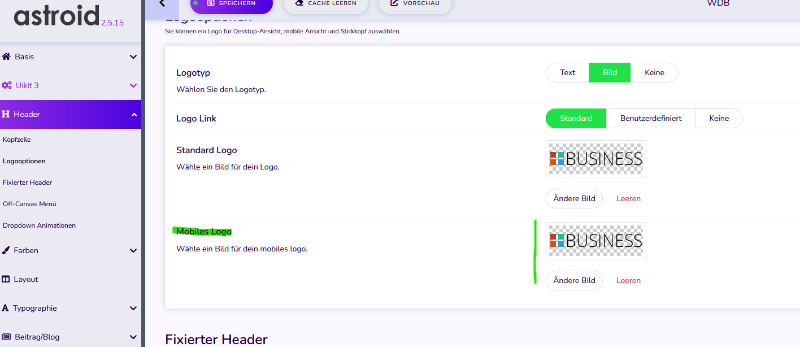
You can set the mobile logo in astroid-framework-header:
Supporter bei forum.joomla.de
Last Edit:3 years 11 months ago
by Administrator
Last edit: 3 years 11 months ago by Administrator.
Please Log in or Create an account to join the conversation.
- joomlaplates
-
 Offline
- Moderator
-
- Posts: 8872
- Thank you received: 1743
Replied by joomlaplates on topic JP-Inspire Logo in mobile view disappeard
Posted 3 years 11 months ago #30514
Hello,
you are using the Warp 7 Framework ( no more support) and your logo is on Module position toolbar-l.
But the toolbar is hidden in mobile view. You can remove the uk-hidden-small class from toolbar in the file
layouts/theme.php
you are using the Warp 7 Framework ( no more support) and your logo is on Module position toolbar-l.
But the toolbar is hidden in mobile view. You can remove the uk-hidden-small class from toolbar in the file
layouts/theme.php
Dokumentation:
www.joomlaplates.de/dokumentation.html
www.joomlaplates.de/dokumentation.html
by joomlaplates
Please Log in or Create an account to join the conversation.
Moderators: joomlaplates