Please always enter the name of the template and the Joomla version and the live URL if available
[SOLVED] Where to change the header image above the Top-menu


Where to change the header image above the Top-menu was created by Milian
Posted 2 years 6 months ago #33634
Hi,
Where can I change the top-header image to my own corporate image?
I cannot find the module. And cannot find it in Astroid.
Thanks a lot for any answer where I can change this image.
Regards,
Milian
Where can I change the top-header image to my own corporate image?
I cannot find the module. And cannot find it in Astroid.
Thanks a lot for any answer where I can change this image.
Regards,
Milian
by Milian

Please Log in or Create an account to join the conversation.

Replied by WM-Loose on topic Where to change the header image above the Top-menu
Posted 2 years 6 months ago #33636
Go to Layout in the template options and select the Header/Mainmenu section.
It will probably be entered in the design settings.
It will probably be entered in the design settings.
by WM-Loose
Please Log in or Create an account to join the conversation.
- joomlaplates
-
 Offline
- Moderator
-

- Posts: 8872
- Thank you received: 1743
Replied by joomlaplates on topic [SOLVED] Where to change the header image above the Top-menu
Posted 2 years 6 months ago #33638
Hello, the pic can be found in the Section > Logo
Background Image, see pic attached
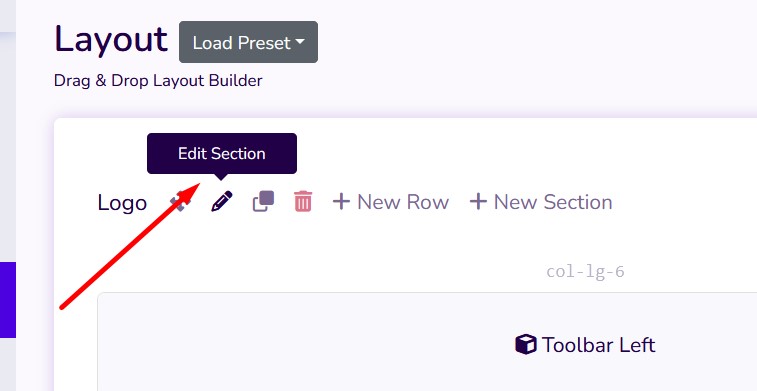
Background Image, see pic attached
Dokumentation:
www.joomlaplates.de/dokumentation.html
www.joomlaplates.de/dokumentation.html
Last Edit:2 years 6 months ago
by joomlaplates
Last edit: 2 years 6 months ago by WM-Loose.
The following user(s) said Thank You: Milian
Please Log in or Create an account to join the conversation.
Moderators: joomlaplates