[SOLVED] UI 3 Gallery, Astroid: Module appears to wide on screen.

UI 3 Gallery, Astroid?: Module appears to wide on screen. How/where to adjust?? was created by bkoppe
Posted 1 year 3 months ago #35435
I'm using the Gallery module with the jp-Travel template.
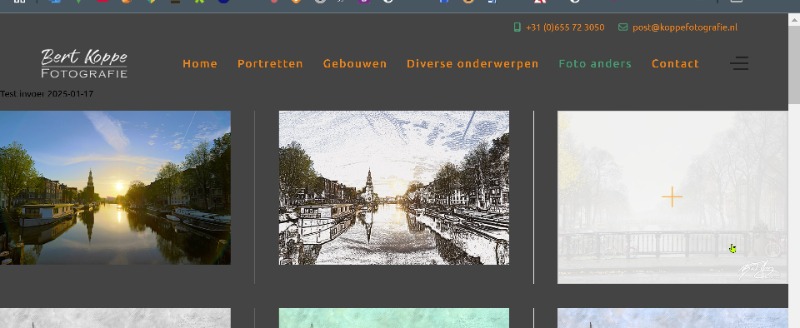
The module appears to wide on screen.
I can not find anywhere how to make the appearance on screen smaller. It appears now from coast to coast.
How/where to adjust??
Thanks for helping me out.
Bert
The module appears to wide on screen.
I can not find anywhere how to make the appearance on screen smaller. It appears now from coast to coast.
How/where to adjust??
Thanks for helping me out.
Bert
by bkoppe
The topic has been locked.

Replied by WM-Loose on topic UI 3 Gallery, Astroid?: Module appears to wide on screen. How/where to adjust??
Posted 1 year 3 months ago #35436
You have to edit the section with padding and define distances to the edge. You do this in the template options under Layout in the respective section and the module position used in it. You can see how this works here:
www.joomlaplates.de/template-konfiguration/layout.html
by WM-Loose
The topic has been locked.
Replied by bkoppe on topic [SOLVED] UI 3 Gallery, Astroid: Module appears to wide on screen.
Posted 1 year 3 months ago #35442
Ha, when you know it, it's simple! 
Erledigt, Thanks.
Bert.
Erledigt, Thanks.
Bert.
Last Edit:1 year 3 months ago
by bkoppe
Last edit: 1 year 3 months ago by WM-Loose.
The topic has been locked.