[SOLVED] small sites on smartphone after update astroid 3-2-4
- solcersoldesign
- Offline Topic Author
- Senior Boarder
-

- Posts: 67
- Thank you received: 2
small sites on smartphone after update astroid 3-2-4 was created by solcersoldesign
Posted 6 months 4 weeks ago #36076
I have buitendezorg.nl and filled with template hotel.
Installed astroid 3-2-4
Looking with desktop its ok, And also with smartphone
But when i update astroid higher then 3-2-4 looking on desktop its ok but lookin it on smartphone the text is in small coloms
This issue is workin so on every site i have no matter what template i used.
Normally updating astroid is not giving issues, but now it gives issues on smartphones
How can i solve it
If you look with smartphone at buitendezorg.nl its wrong
If tou you with smartphone at oudenrenservice-deklaproos.nl its ok
So you can see the difference
Installed astroid 3-2-4
Looking with desktop its ok, And also with smartphone
But when i update astroid higher then 3-2-4 looking on desktop its ok but lookin it on smartphone the text is in small coloms
This issue is workin so on every site i have no matter what template i used.
Normally updating astroid is not giving issues, but now it gives issues on smartphones
How can i solve it
If you look with smartphone at buitendezorg.nl its wrong
If tou you with smartphone at oudenrenservice-deklaproos.nl its ok
So you can see the difference
The topic has been locked.


Replied by WM-Loose on topic [SOLVED] small sites on smartphone after update astroid 3-2-4
Posted 6 months 4 weeks ago #36077
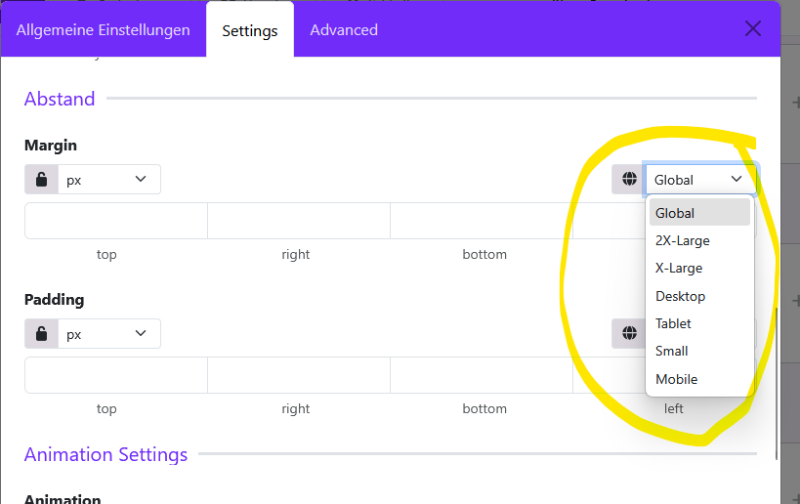
First, update the Astroid version to 3.3.3 and the template to the current version 2.5. Before updating the template, enable debug mode in the Astroid plugin. After updating the template (but update Astroid first), clear all caches (Astroid, Joomla, and browser) and then disable debug mode in the Astroid template. Now you can check if everything is working correctly. If not, you need to check and set the margin and padding for all new display sizes in the template options under Layout. There are now more display sizes (default according to Bootstrap) that you need to consider.
Last Edit:6 months 1 day ago
by WM-Loose
Last edit: 6 months 1 day ago by WM-Loose.
The topic has been locked.